
 -Biz
Mail, chats, events, issues and approvals link to each other.
AI WORK ASSISTANT · GROUPWARE + BUSINESS
Where do I even start today?AI sorts it out first.
AI reads the to-dos scattered across mail, KakaoTalk, LinkedIn, calendars and approvals, and turns them into customer and work schedules. AI drafts the mail; you review and send it. Every task is followed up by project, to the end.
Standardised workRepeats automatedPeople confirm
CONCEPT · WORK IN 3D
All work is connected
One email becomes a customer meeting, the meeting becomes a project issue, and the issue leads to approvals and reports. ProEye-Biz weaves scattered work together in 3D and combines it into the most efficient order.
Work for the same customer or project is grouped automatically.
Today’s work, sorted by priority.
HOW IT WORKS
How AI clears your to-do avalanche
The large pictures are illustrations; the small windows are real screens.
01 · Unified mail · AI reading
All mail in one place, read by AI
Gmail, Outlook and company mail land in one inbox. AI reads them and flags what needs doing — customer requests, meeting proposals, quote deadlines.
- One inbox for every account
- Sorted by customer and project
- To-dos and promises extracted
02 · AI scheduling
Meetings and deadlines, straight into the calendar
AI finds confirmed appointments in mail and chats and adds them as customer or work events, synced with Google Calendar.
- Only confirmed appointments
- Customer vs work events
- Google Calendar sync
03 · AI mail writing
AI drafts it. You check and send it.
Ask "write a quote reply to this customer" and AI leaves a draft in your outbox. You read, edit and send it yourself.
- Write mail by asking
- Bulk mail sent one by one
- A person always sends
04 · Chats → to-dos
KakaoTalk and LinkedIn chats become tasks
Promises and tasks in customer chats go to work management, with progress tracked from to-do to in progress to done.
- Chat promises → events
- Task and progress tracking
- Linked to work management
05 · Project follow-up
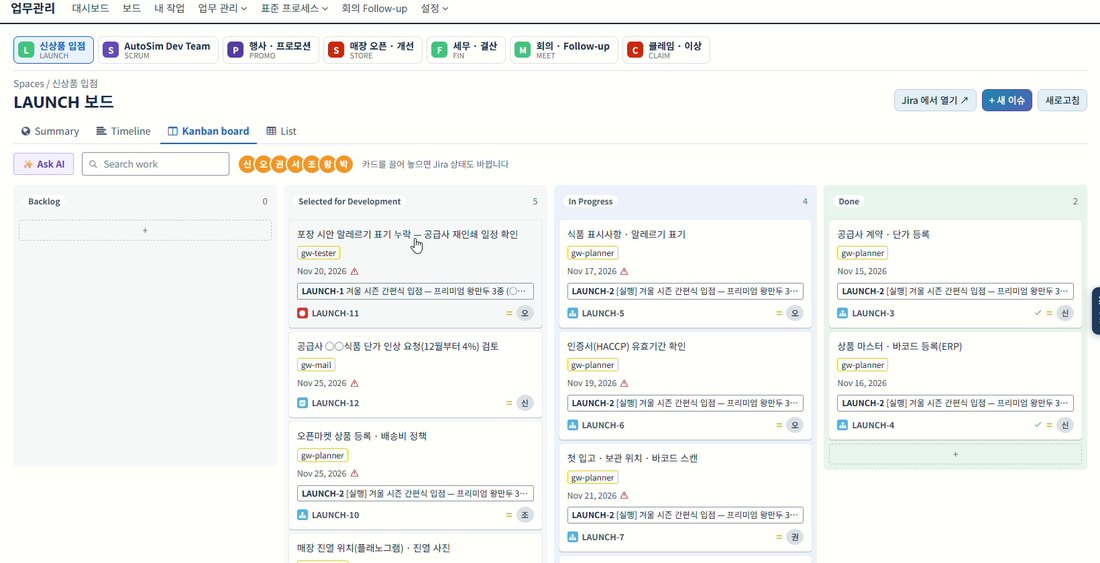
Every task by project, the Jira way
Plan → build → QA → done: cards move through a standard process. Two-way Jira sync keeps developers in Jira while managers see it all on one screen.
- Project × role dashboard
- Two-way Jira sync
- AI weekly reports and bottlenecks
06 · Mobile alerts
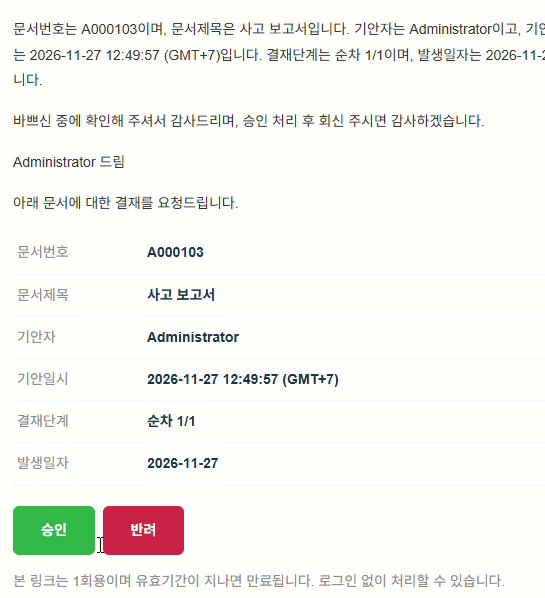
Approve anything with one tap
Schedule, deadline and approval alerts reach your phone. The approve button in approval mail works without signing in.
- Android and Windows apps
- Push and KakaoTalk alerts
- Approve straight from mail
60-SECOND VIDEO
ProEye-Biz in 60 seconds
From a to-do avalanche to a day where AI sorts and people confirm — in one minute (Korean narration).
- 01Unified mail · AI reading
- 02AI scheduling
- 03AI mail — you send it
- 04Chats → to-dos
- 05Project follow-up (Jira process)
- 06Mobile alerts · one-tap approval
ALL IN ONE
Groupware · business management · dev process
Click the logo to switch between the groupware and business workspaces — same data, same account.
Groupware
Calendar, minutes, mail, approvals, messenger, documents and customers in one sidebar.
- Mail → approvals and calendar
- Meeting follow-ups
- Whiteboard and documents
Business management
KPIs, CRM, sales, purchasing, inventory, assets, employees, accounting and tax with the same account.
- KPI dashboard
- Sales · purchasing · stock
- Accounting · tax · payroll
Two-way Jira sync
Issues, status and comments sync both ways; mail, approval and minutes links attach to Jira issues.
- Board · list · timeline
- Drag to change status
- Local mode without Jira
LIVE
See it on screen, not in words.
Real product screens with sample data. Click through the tabs.
Groupware · Inbox
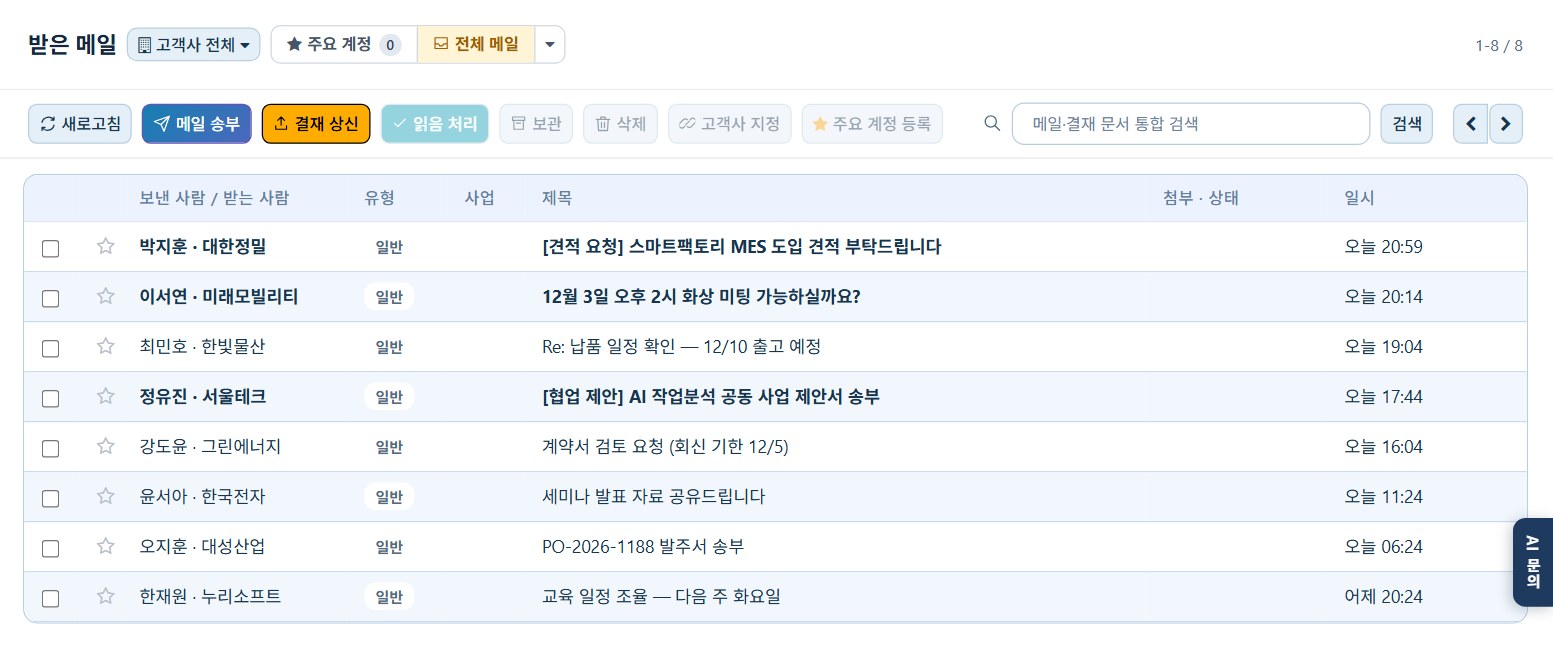
Mail, approvals and customers on one screen
Real product screen · sample dataSeveral mail accounts in one inbox, grouped by customer, with one-click approvals and AI-scheduled to-dos.
Work · Dashboard
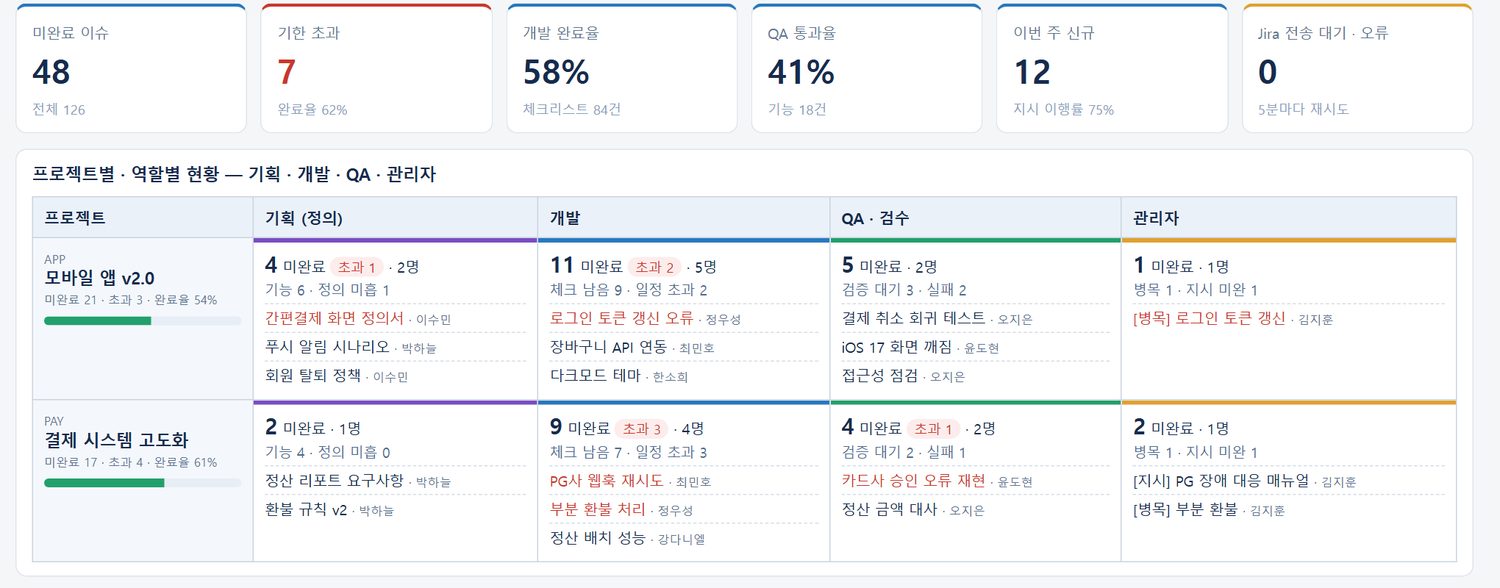
Projects × roles in one table
Real product screen · sample dataOpen and overdue work for planning, dev, QA and managers at a glance.
APP board · Kanban
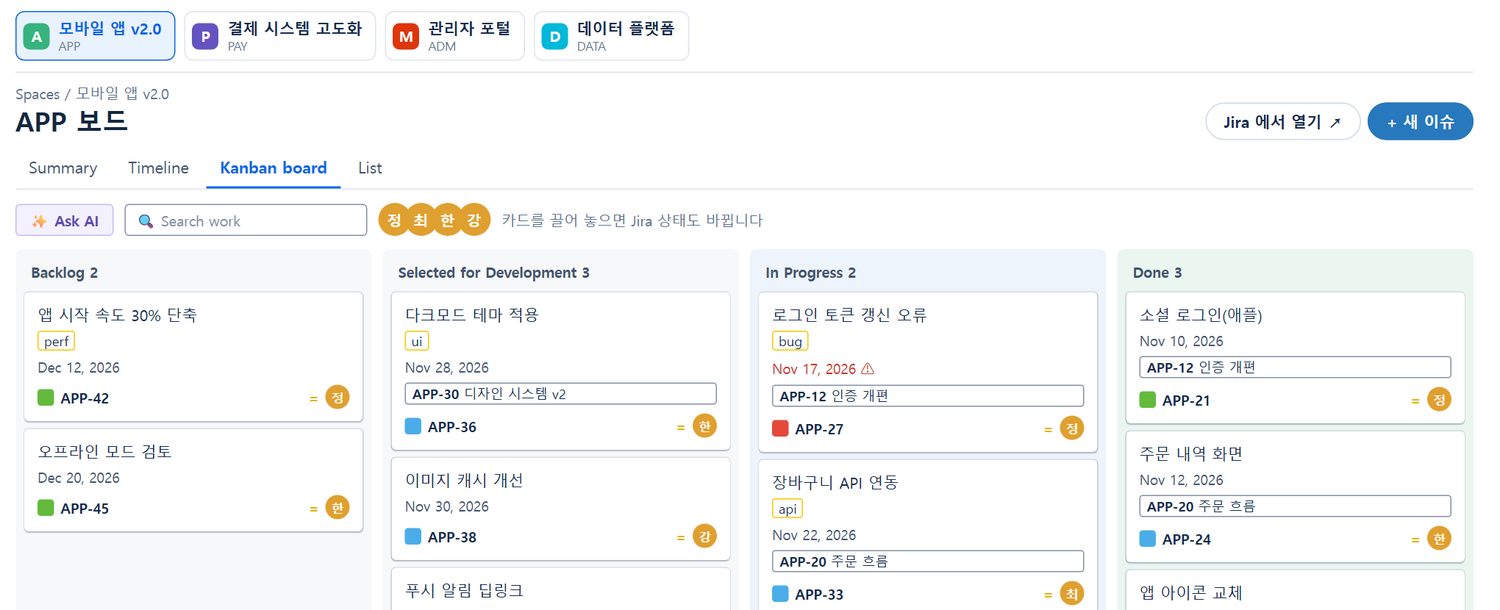
Drag a card, Jira follows
Real product screen · sample dataMoving a card updates its status in Jira, both ways.
APP board · Timeline
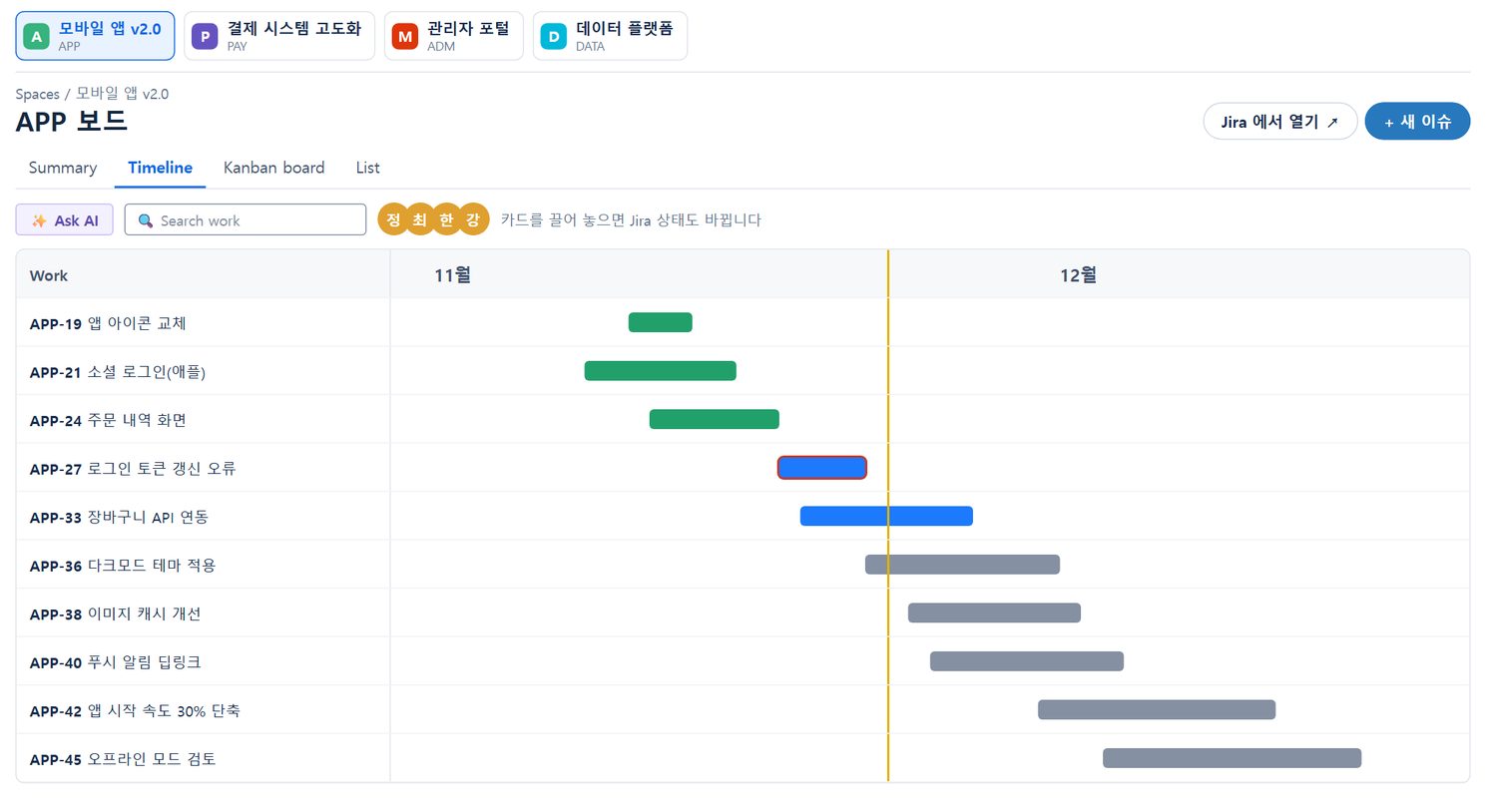
Schedules and due dates on a timeline
Real product screen · sample dataSee the today line and late issues on one screen.
APP board · Ask AI
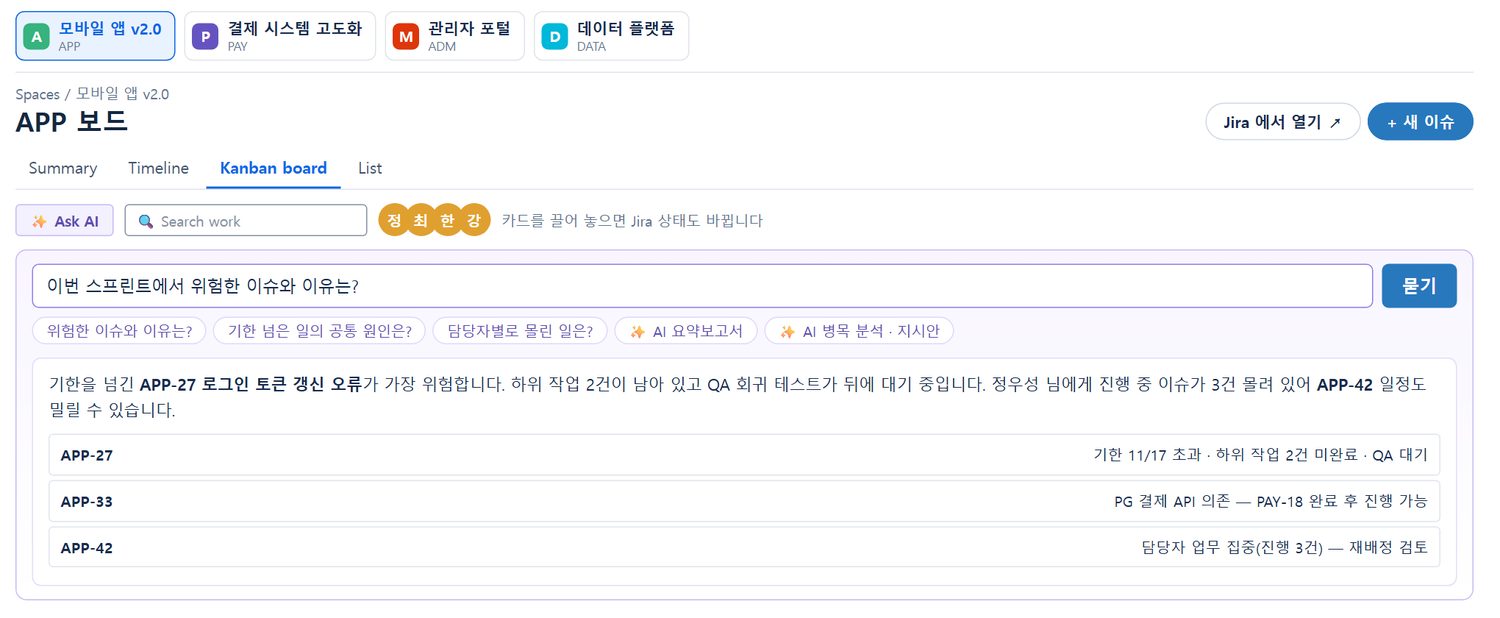
Ask, and AI answers
Real product screen · sample data"Which issues are at risk and why?" with the issues behind the answer.
AI summary report
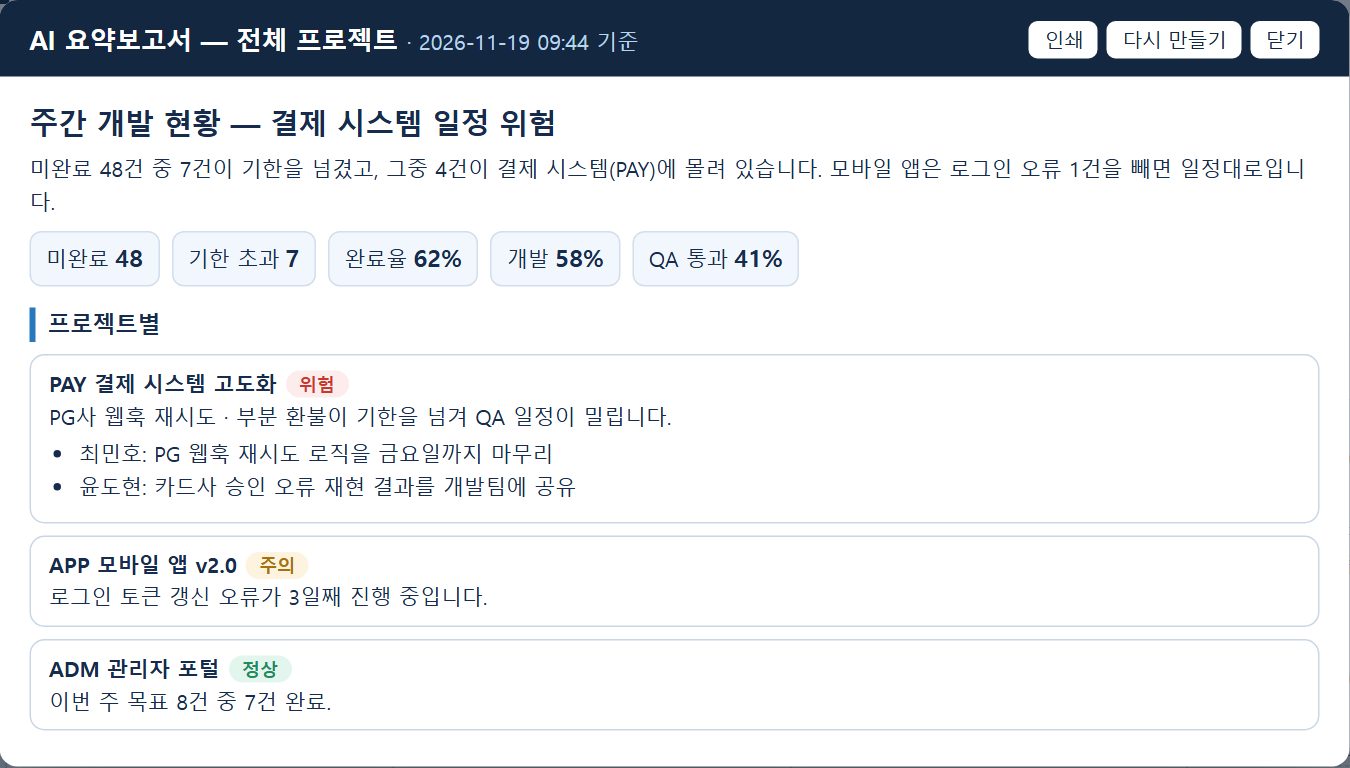
The weekly report, written by AI
Real product screen · sample dataAt-risk projects and next actions per person, on one page.
Mail · AI draft
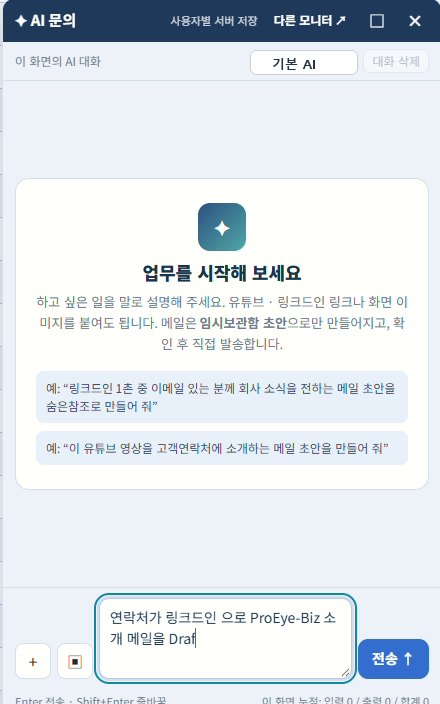
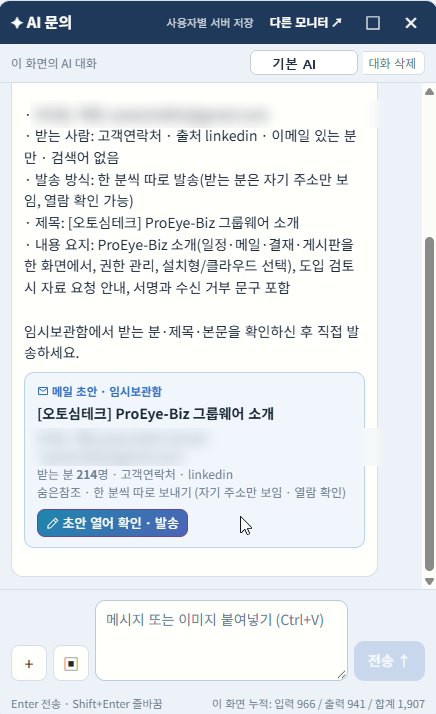
AI drafts, you send
Real product screen · sample dataWrite what you want to say; AI drafts the mail and you send it after checking.
JIRA SYNC
The same issue, on both sides
- 01
Create
A PM creates it in ProEye-Biz; the same issue appears in Jira.
- 02
Work in Jira
Developers change status and comment in Jira.
- 03
Instant update
Webhooks refresh boards and dashboards right away.
- 04
QA · done
Moving to Done transitions the Jira workflow too.
- 05
Linked work
Mail, approval and minutes links attach to the issue.
PROPOSAL
The proposal at a glance
Mail, schedules, approvals and projects unified by AI. Flip through the 13-page proposal (Korean) or download the PDF for internal review.

FAQ
Frequently asked questions
Does AI send mail on its own?
No. AI only leaves drafts in your outbox; a person checks recipients, subject and body and sends it.
Are KakaoTalk and LinkedIn chats organised too?
Yes. In chats connected for work, promises and tasks go to your calendar and work management, with progress tracked.
Can I use it without Jira?
Yes. Projects without Jira run in local mode with the same screens, and can be sent to Jira later.
Do groupware and business management need separate accounts?
No. Same account, same data — click the logo to switch workspaces.
Does it work on mobile?
Android and Windows apps are available, and the same screens work in the browser, with push and KakaoTalk alerts.
START
Standard work. Automated repeats.
Tell us your team size and current tools (mail, messenger, Jira, ERP) and we will suggest the right setup.